The TN e District Portal is the official online citizen service platform of the Government of Tamil Nadu. It helps residents access important government services through a digital system. Instead of visiting offices repeatedly, citizens can apply for certificates, check the status of their applications, verify documents, and download approved records online. As a result, the portal saves time, reduces paperwork, and improves convenience. Moreover, it creates better transparency because users can monitor their requests online. Therefore, many people now prefer digital applications for routine services.
The portal also supports department integration, enabling faster processing and smoother service delivery. Consequently, citizens can complete many public service tasks from home or through authorized centers. Whether someone needs an income certificate, nativity certificate, community certificate, or status update, the TN e District Portal offers a practical solution. Overall, the platform strengthens digital governance in Tamil Nadu while making public services easier, faster, and more accessible for everyone.
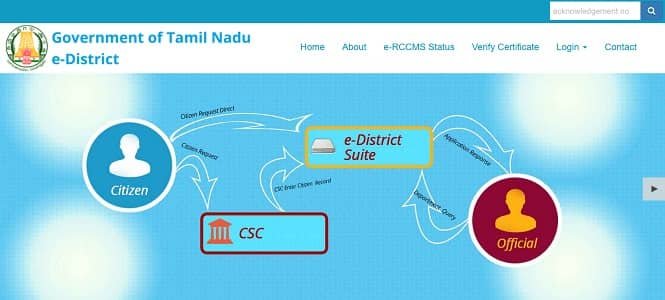
Main Services Available on TN e District Portal
The portal offers several citizen-focused services. Therefore, users can complete many official tasks online without unnecessary delays.
- Income Certificate
- Community Certificate
- Nativity / Residence Certificate
- No Graduate Certificate
- Legal Heir Certificate
- Deserted Women Certificate
- Certificate Verification
- Application Status Tracking
- Department-based public services
- Other revenue-related certificates
TN e District Registration Process
New users generally need registration before accessing supported online services. Fortunately, the process is simple and user-friendly.
Steps to Register:
- Visit the official TN e District Portal: https://tnedistrict.tn.gov.in/tneda/
- Click the login or registration option.
- Enter required personal details.
- Provide mobile number and email ID.
- Create a username and a password.
- Verify OTP if prompted.
- Submit the registration form.
After successful registration, users can log in and use available services.
TN e District Login Process
Once registration is complete, users can log in anytime and access services easily.
Steps to Login:
- Open the official website: https://tnedistrict.tn.gov.in/tneda/
- Click Login.
- Enter username or user ID.
- Type the password carefully.
- Fill captcha if required.
- Click Login.
After logging in, users can apply for services, check the status, and manage their applications.
Eligibility for TN e District Services
Eligibility depends on the selected service. However, some common conditions apply in many cases.
General Eligibility:
- The applicant should be a resident of Tamil Nadu for resident-based services.
- Valid identity proof is necessary.
- An active mobile number is required.
- Correct supporting documents should match the application.
- Applicant must satisfy service-specific rules.
Service-Based Eligibility:
Income Certificate: Income proof may be required.
Community Certificate: Family or community records may be needed.
Nativity Certificate: A residence proof is generally required.
Legal Heir Certificate: Family relationship documents may be required.
Therefore, applicants should review service conditions before applying.
Required Documents
Although documents vary by service, these are commonly requested:
- Aadhaar Card
- Voter ID Card
- PAN Card
- Passport-sized photograph
- Address proof
- Ration Card
- Electricity bill
- Income proof
- School records
- Family records, if applicable
Consequently, users should keep scanned copies ready before starting the process.
How to Apply Online
The portal makes online applications easier and faster. Hence, users can avoid long queues and repeated visits.
Application Steps: Log in to the portal.
- Choose the required service.
- Fill the online application form carefully.
- Upload necessary documents.
- Review all entered details.
- Submit the form.
- Save the reference or application number.
Then the concerned department begins verification and processing.
How to Check TN e District Application Status
The application tracking feature helps users stay up to date. Therefore, they do not need repeated office visits.
Steps to Check Status:
- Visit the official portal.
- Click Application Status.
- Enter application ID or reference number.
- Provide applicant details if required.
- Submit the information.
- View the latest status online.
Status may appear as pending, under review, approved, or rejected.
How to Verify Certificates
The portal also allows certificate verification. As a result, users can confirm authenticity online.
Steps to Verify:
- Open the official website.
- Click Verify Certificate.
- Enter certificate details.
- Submit the information.
- View verification result.
Benefits of TN e District Portal
The platform offers several practical advantages. Therefore, it has become highly useful for citizens.
Key Benefits:
- Saves time
- Reduces office visits
- Online status tracking
- Easy certificate verification
- Faster service delivery
- Better transparency
- Convenient digital access
- Multiple services in one place
- Helpful for rural and urban users alike
Common Problems and Solutions
1. OTP Not Received
Wait a few minutes, then retry. Also, check the mobile signal.
2. Login Failed
Enter the correct credentials and refresh the page.
3. Document Upload Error
Use clear files with a smaller size.
4. Application Pending
Track status regularly and contact the relevant office if needed.
5. Wrong Details Submitted
Use correction options if available or apply again according to rules.
Final Words
The TN e District Portal has simplified access to public services in Tamil Nadu. Instead of visiting offices multiple times, citizens can register, log in, apply, verify certificates, and track requests online. Moreover, the portal saves time and improves transparency. Therefore, it continues to play an important role in modern digital governance across the state.
FAQs
Q: What is the TN e District Portal?
It is the Tamil Nadu government’s online citizen service portal.
Q: What is the official website?
This is the official website https://tnedistrict.tn.gov.in/tneda/
Q: Is registration necessary?
Yes, registration is generally required for many services.
Q: Can I check application status online?
Yes, use the Application Status option on the portal.
Q: Which certificates are available?
Income, community, nativity, legal heir, and several other services are available.
Q: Can I verify certificates online?
Yes, the portal provides an online certificate verification feature.
Q: Can I use the portal on mobile?
Yes, users can access the portal through mobile browsers.
Q: Who can use this portal?
Mainly Tamil Nadu residents who need supported public services.